

 Tiếng Việt
1. What is Binance Bridge?
Binance Bridge is a cross-chain bridge developed by Binance, the top cryptocurrency exchange today.
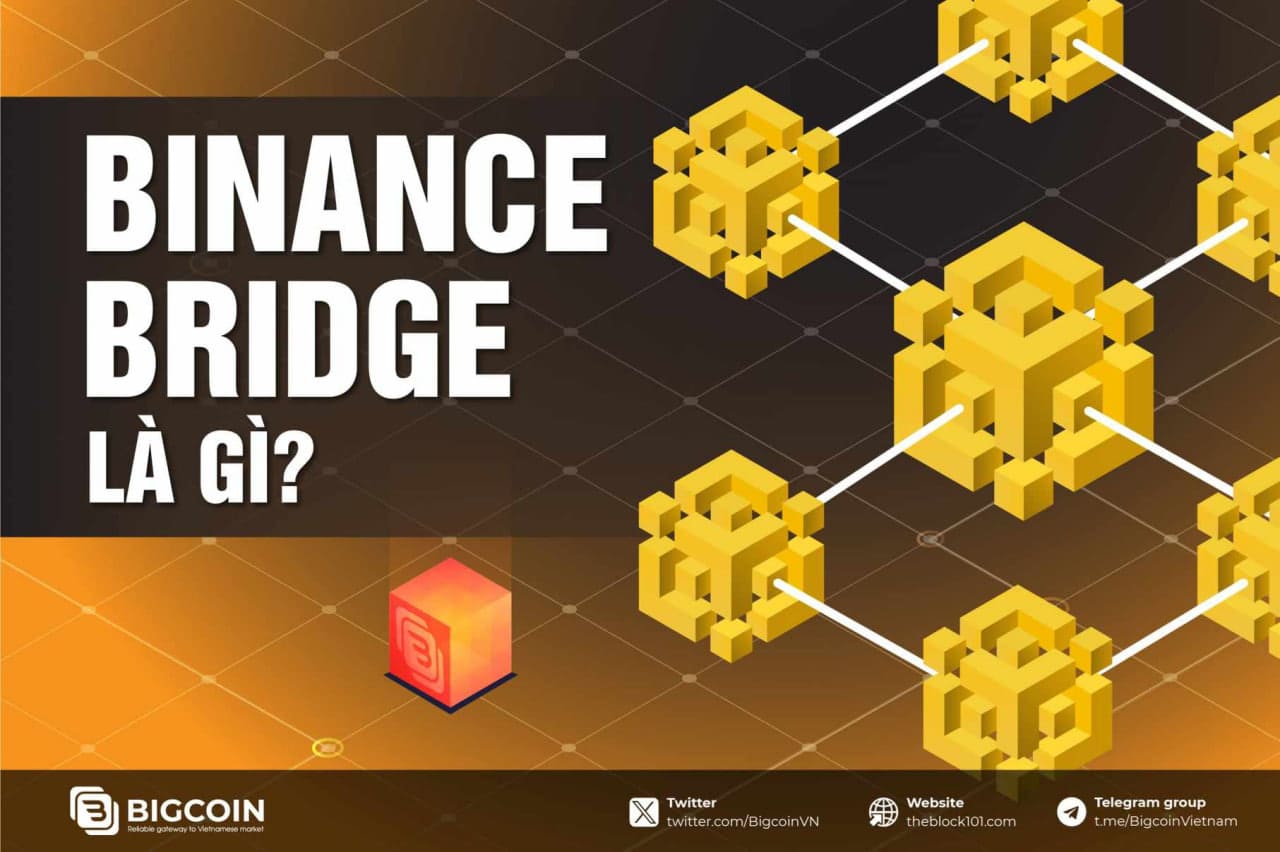
Its purpose is to enable users to convert tokens across different blockchain standards, with the ERC-20 standard being a notable example. For instance, if you hold Bitcoin but want to participate in DeFi activities on the Ethereum network, a blockchain bridge allows you to do so without having to sell your Bitcoin. Blockchain bridges are fundamental for achieving interoperability within the blockchain space.
One of the primary issues with most blockchain systems is their incompatibility with one another. Binance Bridge addresses this issue by providing access to the Binance Smart Chain (BSC).
What is Binance Smart Chain (BSC)?
Binance Smart Chain (BSC) is an Ethereum-compatible blockchain that operates in parallel with Binance Chain, rather than replacing the old platform. Transaction fees on BSC are significantly lower. Moreover, Binance Chain (BNB) users can transfer from the BNB chain to the BSC chain via the BEP-20 standard and bridge between Binance’s two blockchains.
Additionally, users can use Binance Bridge to perform cross-chain transactions, and Binance Wallet supports exchanges between BNB and BSC.
2. How Binance Bridge Works
To understand how Binance Bridge operates, it’s helpful to know about "wrapped tokens." Wrapped tokens represent an asset, such as BTC or ETH, on a different blockchain. These tokens are pegged to match the value of the original asset on its native blockchain.
Different blockchains provide different functions and can’t interact with each other directly. For example, Bitcoin’s blockchain has no knowledge of activities on Ethereum’s blockchain. However, wrapped tokens create bridges that allow interoperability across different blockchains.
Binance Bridge enables the conversion of various cryptocurrencies, including BTC, ETH, and USDT, into wrapped tokens (or pegged tokens) that are compatible with applications on Binance Smart Chain.
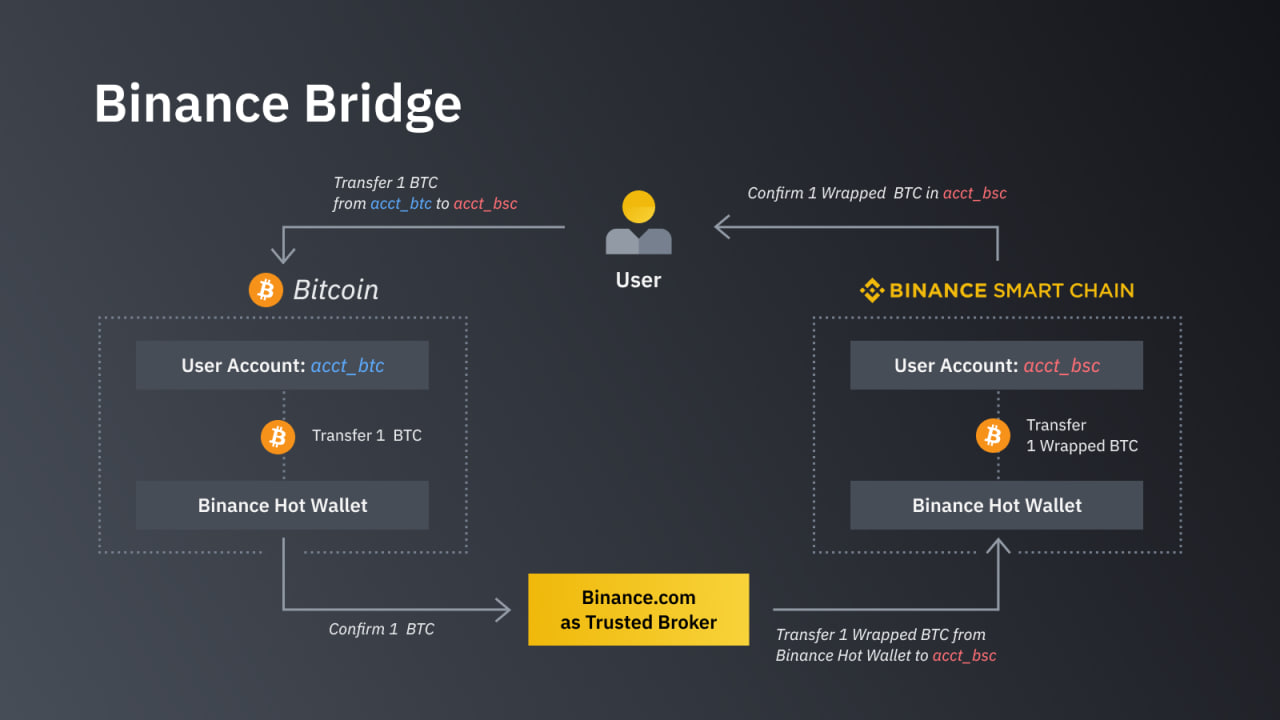
The Binance Bridge system supports the conversion of ERC-20 tokens, a main standard on Ethereum, and TRC-20 tokens, a similar standard in TRON’s ecosystem. Users can convert TRC-20 and ERC-20 tokens into BEP-2 or BEP-20, the primary standards for Binance Chain and Binance Smart Chain, respectively.
BNB is the native coin of both chains. Binance Bridge provides a fast solution, taking just minutes to wrap and send a token. However, not all blockchains support this, and transaction confirmation times can also affect the process.
Binance Bridge doesn’t add extra fees for wrapping tokens—users only pay transaction fees. Although creating a Binance account isn’t necessary to access the platform’s bridge service, having an account allows users to access a wide range of BEP-20 and BEP-2 assets for deposits and withdrawals.
Characteristics of Pegging
The Binance Blockchain service allows the conversion of various crypto assets into wrapped coins on BC and BSC. This process is known as "pegging" — either in or out. Wrapping tokens is called pegging in, while pegging out refers to the reverse process of converting wrapped tokens back to their original blockchain.
Before pegging tokens, you must register a Binance Bridge MetaMask or Binance Chain wallet. To receive a personal address for deposits, submit a request specifying the original chain you need to convert and the number of coins. Note that the generated address is valid only for a specific time frame. Depositing tokens within this timeframe will accumulate them in your BC/BSC address. Binance Bridge locks tokens following transactions.
3. Introducing Binance Bridge 2.0
Binance Bridge 2.0 is an upgraded version of the original Binance Bridge, enabling users to convert any token from Ethereum to the BNB Chain as BTokens, even if the token is not listed on Binance. With its permissionless feature, users can bridge tokens without requiring approval, thus gaining access to DeFi, gaming, and metaverse activities on the BNB Chain.
Along with support for the Binance App wallet, Bridge 2.0 allows for the use of self-custody wallets. An automated token circulation control system has been implemented to prevent excess wrapped tokens. This new version now supports nearly all Ethereum network tokens, with fast transactions and future plans to expand connectivity to other blockchains.
.jpg)
4. How to Use Binance Bridge
To use Binance Bridge, you must first set up a Binance Chain Wallet to access the platform’s bridging service. Follow these three steps:
- Visit the Official Binance Chain Website: Click on the "Wallet" tab and select BC Wallet to install the browser extension.
- Create a Wallet: A wallet icon will appear in the top-right corner of your browser. Open it and enter an 8-character password twice to create the wallet.
- Save Your Seed Phrase: You’ll receive a random 12-word seed phrase. Keep this secure, as it will allow you to recover access if you lose your password.
Once you’ve completed these steps, you can begin converting assets through Binance Bridge. The process is straightforward, though it may be a bit challenging for newcomers. For example, if you need to make a Bitcoin transaction between Ethereum and BSC, follow these steps:
-
Go to Binance Chain’s Website: Select the Bridge tab.
-
Choose a Method:
- Option 1: Use Binance.com for deposits and withdrawals.
- Option 2: Choose a cross-chain solution.
In this guide, we’ll use the first option — Binance.com deposit & withdrawal.
-
Deposit Funds: Log in to your Binance account, go to your wallet, and click on the "Deposit" button.
![]()
There are two options for depositing:
- Select Crypto Deposit if you already have a funded crypto wallet.
- For Fiat Deposit, prepare your credit or debit card.
-
Withdraw Funds: After depositing, go to your Binance wallet and click the "Withdraw" button next to "Deposit."
-
Select Network: For instance, if you’ve bought some USDT and want to transfer it to an ETH blockchain wallet, paste the destination wallet address and choose the network. Double-check to ensure accuracy.
Currently, Binance supports the following networks for USDT transfers:
-
Enter the Amount and Withdraw: Processing time will depend on the confirmation by the network block node. If using Binance Bridge for the first time, start with a small test amount to ensure you’ve entered the correct wallet address.
5. Benefits and Risks of Using Binance Bridge
5.1. Benefits
Binance Bridge provides numerous benefits to the crypto market:
- Flexibility: It offers a flexible way to transfer digital assets between blockchains, allowing users to utilize the unique features of each blockchain.
- Transaction Speed: Binance Bridge is designed to enable quick transactions, minimizing wait times when transferring digital assets between blockchains.
- Integration with the Binance Ecosystem: It integrates closely with other Binance products and services, creating a seamless user experience across Binance's ecosystem.
- Multi-Blockchain Support: Binance Bridge supports various blockchains, expanding users' interoperability across different ecosystems.
5.2. Potential Risks
- Security Risks: Like any cross-blockchain tool, Binance Bridge may face security risks, including potential cyber-attacks and privacy concerns.
- Ecosystem Dependency: The success of Binance Bridge is closely tied to Binance’s ecosystem and strategic decisions, which may impact the bridge’s functionality if there are significant strategy shifts.
- High Load Capacity: An unexpected surge in transactions and usage of Binance Bridge could impact its performance and transaction speed.
- Legal Risks: Given its function in transferring digital assets across blockchains, Binance Bridge may encounter regulatory challenges in certain jurisdictions.
- Market Risks: Cryptocurrency market fluctuations could affect asset values during transfers, posing potential value loss for users.
Like any technology or service, using Binance Bridge requires careful consideration and understanding of its benefits and risks.
6. Frequently Asked Questions (FAQs)
Q1: Where are converted tokens stored?
For tokens listed on Binance, they are stored in your Spot or Funding wallet in the Binance App. For unlisted tokens, they will only appear in the Funding wallet. In the case of a self-custody wallet, unlisted tokens can still be stored.
Q2: Are there fees for using Binance Bridge?
Binance Bridge does not charge additional fees, but you must pay network gas fees depending on the blockchain used.
Q3: How long does a transaction take on Binance Bridge?
Transaction time varies depending on the blockchain network, but on the BNB Chain, it generally takes just a few seconds.
7. Conclusion
In summary, Binance Bridge has emerged as a crucial tool in the ongoing evolution of blockchain technology, marking a significant step in addressing cross-chain interoperability challenges. This article has taken you through the multi-faceted world of Binance Bridge and its vital role in optimizing asset transfers across blockchains.
Read More:

.jpg)
.jpg)
.jpg)
.jpg)